License Requirements
Last updated: 09 Jan 2023
Overview
Euclid Studio must be used in accordance with the license agreement that you agreed to upon installation, and only by users who are covered by that license agreement. Please consult that licensing agreement and contact us if you have any technical or sales related questions.
There are two categories of Euclid Studio licensing:
License Activation
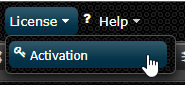
Euclid Studio requires a license key to be installed and activated. This can be performed in Euclid Studio by navigating to the Activation option under the License dropdown.
Automatic Activation
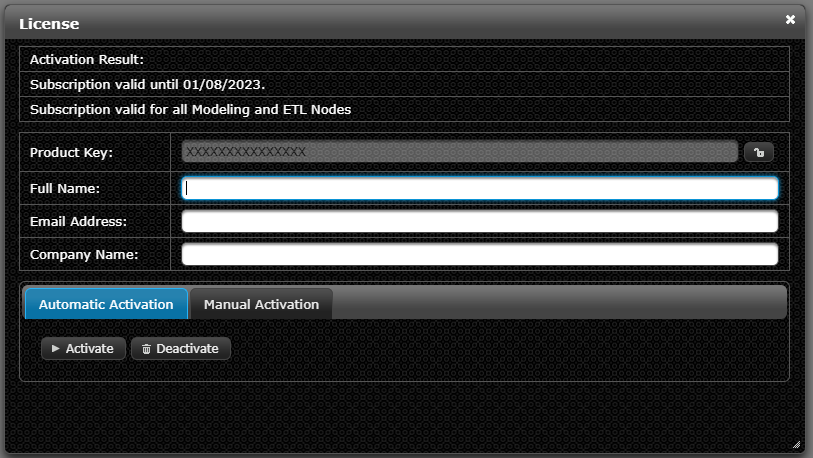
Enter the license key and your information in the form, then push the Activate button. Activation is performed over the internet and an activation of the software will be consumed and recorded for licensing purposes. Depending on the type of license purchased you may be limited to types of nodes you have available. To remove an activation click the Deactivate button.
Manual Activation
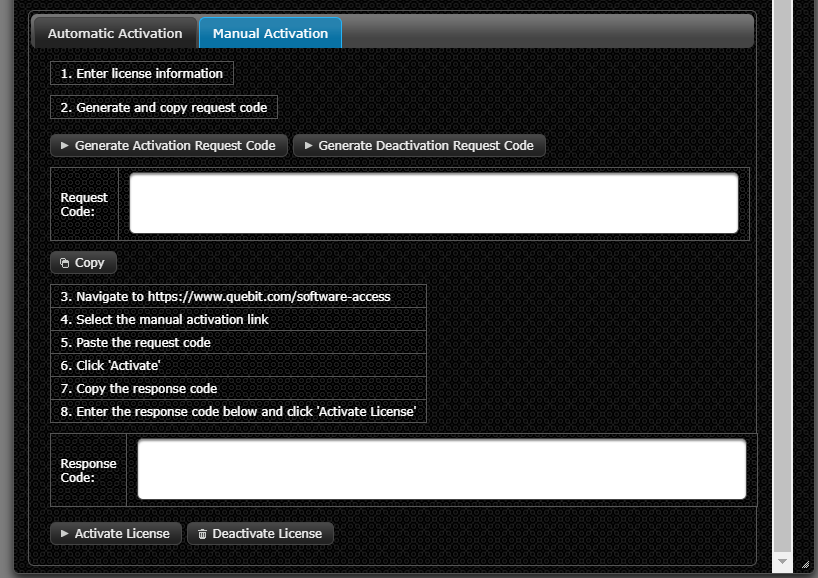
If no internet connection is available then a manual activation must be performed. This is a 3 step process where a request code is obtained by the software via the clipboard which is then entered manually using the Manual Activation link on the https://QueBIT.com/software-access page from a machine that has an internet connection.
Step 1: Copy the Activation code to the clipboard.
Step 2: Navigate to the Manual Activation web page from a machine with internet access using this URL: https://QueBIT.com/software-access.
Step 3: Enter the Activation Code and Copy the Response to Euclid Studio:
After activating the request code you must then copy the response code and return to the machine where Euclid Studio is installed. The Response code is provided back to Euclid Studio via the clipboard.
Paste the response code in Euclid Studio.
Any manual license activation is valid until the expiration of your current license term and will need to be re-activated for continued use.