Flat File
Last updated: 23 Dec 2022
Documentation
Examples
Load a quoted CSV file with a header
The following file needs to be loaded:
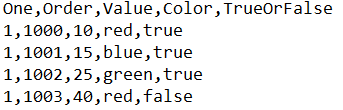
The file above is comma separated, with no quote character around the data fields.
In order to load this file:
- Reference
FlatFileSourceCSV.csvinto theFile Nameinput. - Select
commafor theDelimiterinput. - Select
NONEfor theQuote Characterinput. - Click
Infer Data Types - Click
Preview, verify the preview data - Click
Save
The node is now ready to be connected to another node.
Load an unquoted PSV file
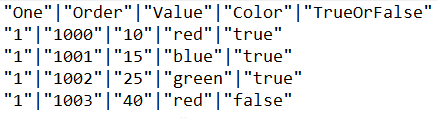
The file above is pipe separated, with no quote character around the data fields.
In order to load this file,
- Reference
FlatFileSourcePSV.psvinto theFile Nameinput. - Select
pipefor theDelimiterinput. - Select
DOUBLEfor theQuote Characterinput. - Click
Infer Data Types - Click
Preview, verify the preview data - Click
Save
The node is now ready to be connected to another node.
Load a CSV file, change field data types
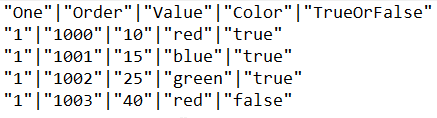
The file above is pipe separated, with no quote character around the data fields.
In order to load this file,
- Reference
FlatFileSourceDataTypesOverride.psvinto theFile Nameinput. - Select
pipefor theDelimiterinput. - Select
DOUBLEfor theQuote Characterinput. - Click
Infer Data Types - Click
Advanced - Change a field data type
- Click
Preview, verify the preview data - Click
Save
The node is now ready to be connected to another node.