logo
QueBIT Product Documentation
Wiki
Initializing search
    • ControlWORQ
      • Welcome
      • Release Notes
      • Introduction
        • Introduction to ControlWORQ
        • Planning Analytics Security
        • ControlWORQ Basics
          • Financial Consolidations and Planning Analytics
          • Journal Entries
          • Intercompany Eliminations
          • Cube Dimension & Configuration
          • Audit Trails and Reporting
      • User Guide
        • Overview
        • Web Client
          • Web Client Guide
          • Working with Journal Entries
        • Excel Client
          • Excel User Interface
          • Excel Client Guide
          • Using VBA with ControlWORQ
      • Administration Guide
        • Overview
        • Installation
        • Installation
          • System Requirements
          • Installation Guide
        • Administration
          • Cube Configuration
    • DataWORQ
      • Installation
        • Native
          • Prerequisites
          • Windows Installation
          • Windows Authentication (SQL Server JDBC)
          • Upgrading
          • Uninstalling
        • Native Installer
          • Prerequisites
          • Windows Installation
        • Containerized
          • Containerization Overview
          • Prerequisites
          • Windows Installation
          • FAQs
        • Common
          • License Requirements
          • Setting the Security Mode
          • Managing Users
      • Getting Started
        • What is a Flow?
        • Setting up a New Flow
        • Running a Flow
      • Reference Guide
        • Canvas
          • Adding and Connecting Nodes
          • Configuring and Running Nodes
          • Add to Canvas
        • Flow Menus
          • File
          • Email Alerting
          • Flow Details
          • Run Profiles
            • Orchestration
            • Parameters
            • Parameters By Node
        • Content
          • File Management
          • Flow Management
        • Nodes
          • Common Node Features
          • Source
            • Flat File
            • Database
            • Script
            • User Input
            • Planning Analytics
            • Anaplan Transactional
            • Anaplan Bulk
            • Excel File
            • Pigment
            • Smartsheet
            • OneStream
            • Adaptive
            • S3
          • Column
            • Derive
            • Filter
            • Filler
            • Reorder
            • One Hot Encoder
            • Script
            • Pivot
          • Row
            • Sort
            • Select
            • Partition
            • Join
            • Union
            • Aggregate
            • Balance
            • Sequence
          • Text
            • Text Search
            • Topic Model
            • Cleanse
          • Prediction
            • Forecast
            • Classification
            • Regression
            • Association
            • Cluster
            • Survival
            • Forecast Strategy
            • Forecast Single Strategy
          • Optimization
            • NL Optimization
            • LP Optimization
          • Output
            • Database
            • Command Line
            • REST Command
            • Script
            • Flow
            • Planning Analytics Process
            • Anaplan Process
          • Export
            • Flat File
            • Database
            • Planning Analytics
            • Anaplan Transactional
            • Anaplan Bulk
            • Excel File
            • Pigment
            • Smartsheet
            • OneStream
            • Adaptive
            • S3
          • Calculation & Analysis
            • Time Series
            • Business Rule
            • Frequency
            • Forecast Accuracy
            • White Noise
            • Forecast Category
            • Chart
          • Flow Control
            • Stop Execution
        • Jobs
          • Jobs Scheduler
          • File Watcher
          • Cube Watcher
          • Activity
            • Active Jobs
            • Inactive Jobs
        • Connections
          • Cloud Connector
          • Data Connections
          • SMTP Connection
        • Users
          • Active Sessions
          • Flow Conflicts
          • User Management
            • Manage Interactive Users
            • Manage API Users
        • Settings
          • Application Settings
          • Licensing
        • Exercises
          • Node Examples
            • Source
              • Flat File
              • Script
              • User Input
            • Column
              • Filter
            • Row
              • Sort
            • Text
              • Cleanse
            • Output
              • Flow
            • Export
              • Flat File
          • How-To Exercises
            • Intro to DataWORQ
              • Copy a Flow
              • Flow Conflicts
              • Run Part of a Flow
              • Node Notes
              • Flow Errors
            • Flat File Management
              • Combine Columns from Files
              • Aggregate Data from Files
        • About
          • Wiki
          • References
          • About
          • System Info
        • Business Problems and Use Cases
          • Business Problems
            • Intro to DataWORQ
            • Database Management
            • New Features and Orchestration
            • Advanced Scripting
            • Technical Orchestration
            • Cleaning Text with Regular Expressions
            • Setup and Configuration
          • Use Cases
            • Common Tasks
              • Create a Flow from an Existing Flow
              • Run Part of a Multi-Branch Flow
              • Review User Activity
              • Review a Flow Error
            • Moving Data
              • Flat Files to a Database
              • Between Tables
              • Change a Table Name Across Many Nodes
              • Replacing Flat Files with Database Tables
            • Transforming Data
              • Manipulate Date Strings
              • Clean and Aggregate Multiple Text Files
              • SQL Queries
      • New Features
        • In-App Help
        • Hotkeys
      • REST API
        • Using the REST API
        • REST API Reference
        • Cloud Connector API Reference
      • Release Notes
        • Clone - DataWORQ Release Notes
        • DataWORQ Release Notes
        • Exercise Release Notes
      • Legacy Versions
        • Euclid Studio (v4 and lower)
          • Getting Started
          • Live Demo
          • Basic Mechanics
            • Node Canvas
            • Adding and Connecting Nodes
            • Configuring Nodes
            • Creating and Saving Flows
            • Opening Flows
          • Server Configuration
            • Create a Database Connection
            • Cloud Connector
            • SMTP Settings
            • Preferences
          • Node Guide
            • Source
              • Database
              • Flat File
              • Script
              • User Input
            • Column
              • Derive
              • One Hot Encoder
              • Time Series
              • Filter
              • Filler
              • Reorder
              • Business Rule
              • Script
            • Row
              • Sort
              • Aggregate
              • Select
              • Join
              • Balance
              • Union
              • Partition
            • Text
              • Cleanse
              • Topic Model
              • Expression Search
            • Prediction
              • Association
              • Regression
              • Classification
              • Cluster
              • Forecast
              • Survival
            • Optimization
              • NL Optimization
              • LP Optimization
            • Output
              • Flow
              • Script
              • REST Command
              • Command Line
              • Database Command
              • Chart
            • Export
              • Flat File
              • Database
          • Executing Flows
            • Planning Analytics
            • REST API
            • Web Interface
          • Orchestration
            • Parameters
            • Run Profiles
            • File Watcher
            • Jobs Scheduler
          • Deprecated Features
            • APIs (Deprecated)
              • REST API
              • URL API
            • Command Line Interface (Deprecated)
              • JAR File
        • Euclid Studio (v5)
          • Installation
            • Prerequisites
            • Windows Installation
            • Windows Authentication
            • Upgrading
            • Uninstalling
            • License Requirements
          • Getting Started
            • What is a flow?
            • Setting Up a New Flow
            • Running a Flow
          • Reference Guide
            • Canvas
              • Adding and Connecting Nodes
              • Configuring and Running Nodes
              • Add to Canvas
            • Flow Menus
              • File
              • Email Alerting
              • Flow Details
              • Run Profiles
                • Orchestration
                • Parameters
                • Parameters by Node
            • Nodes
              • Common Node Features
              • Source
                • Flat File
                • Database
                • Script
                • User Input
                • Planning Analytics
                • Anaplan Transactional
                • Anaplan Bulk
                • Excel File
                • Pigment
              • Column
                • Derive
                • Filter
                • Filler
                • Reorder
                • One Hot Encoder
                • Script
              • Row
                • Sort
                • Select
                • Partition
                • Join
                • Union
                • Aggregate
                • Balance
                • Sequence
              • Text
                • Cleanse
                • Text Expression Search
                • Text Topic Model
              • Prediction
                • Forecast
                • Classification
                • Regression
                • Association
                • Cluster
                • Survival
                • Forecast Strategy
                • Forecast Single Strategy
              • Optimization
                • NL Optimization
                • LP Optimization
              • Output
                • Database
                • Command Line
                • Rest Command
                • Script
                • Flow
                • Planning Analytics Process
                • Anaplan Process
              • Export
                • Flat File
                • Database
                • Planning Analytics
                • Anaplan Transactional
                • Anaplan Bulk
                • Excel File
                • Pigment
              • Calculation & Analysis
                • Time Series
                • Business Rule
                • Frequency
                • Forecast Accuracy
                • White Noise
                • Forecast Category
                • Chart
            • Jobs
              • Jobs Scheduler
              • File Watcher
              • Cube Watcher
              • Activity
                • Active Jobs
                • Inactive Jobs
            • Connections
              • Cloud Connector
              • Data Connections
                • Flow Connections
                • User Saved Connections
            • Users
              • Active Sessions
              • Flow Conflicts
            • Settings
              • Preferences
              • Licensing
            • About
              • Wiki
              • References
              • About
              • System Info
          • New Features
            • In-App Help
            • Hotkeys
          • REST API
            • Using the REST API
            • REST API Reference
    1. DataWORQ
    2. Reference Guide
    3. About

    Wiki

    Last updated: 13 Jan 2023

    Clicking on the Wiki link will open the DataWORQ Documentation Web Site.
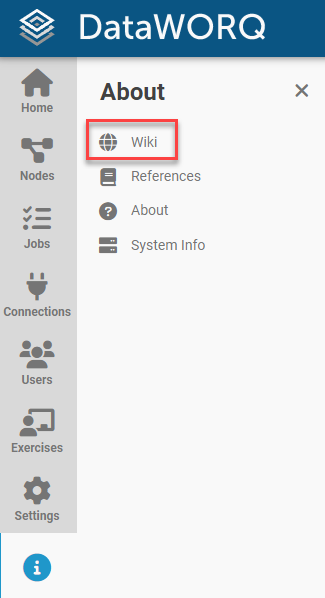
    Wiki link

    Copyright © QueBIT Consulting
    Made with Material for MkDocs